
This is a selection of modifications I’ve done for Diablo 2. They’re mostly small gameplay tweaks or fixes that you can mix and match with each other or mods from other authors as you see fit.
All mods require the Lord of Destruction expansion and at least version 1.12. Some mods may have different requirements, though, so check the included readme files for more information.
Mods on this Page
- Demon Hunter Class
- Consistent Leveling
- 10 x 10 Stash
- Balanced Better Drops
- Fixed Font
- Easy Socketing and Respec
- No Intro
- No Equipment Loss on Death
Demon Hunter Class Mod
This mod modifies the Amazon class to be more like the Demon Hunter from Diablo 3. This is mainly done by replacing the useless spear and javelin skills with all new skills. Many of these new skills are based on Assassin trap skills, so you could say that this is a merging of the two classes.
New Skills
- Caltrops (1) — tosses a cluster of spikes to slow pursuers
- Smoke Screen (6) — creates a cloud of smoke to cover your escape
- Shock Turret (6) — constructs a turret that fires lightning bolts at nearby enemies
- Poison Shuriken (12) — throws a poisoned ninja star that hits every enemy in its path
- Engineering (12) — increases the number of shots that each turret takes
- Grenades (18) — tosses a cluster of grenades that do fire damage in a small area
- Fire Turret (18) — constructs a turret that fires exploding arrows at nearby enemies
- Perimeter (24) — creates a magical barrier that enemies cannot cross
- Mine (30) — drops a mine at your feet that does massive damage in a large area when triggered
- Strafe Turret (30) — constructs a rapid-fire turret that shoots regular arrows at nearby enemies
Other Changes
- Amazon bows add points to any of the three skill trees now instead of only the bow and crossbow tree
- Amazon starting weapon is changed to a short bow and quiver instead of a javelin and shield
-

- Demon Hunter Skills

 2.48K
2.48K
Consistent Leveling Mod
Improves game pacing by making characters level more consistently instead of progressively slower
-

- Percent More XP than Last Level to get to Next Level

-
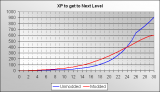
- XP to get to Next Level

-

- Level Difference

This mod changes the amount of experience needed to reach levels 4 through 30 such that the frequency of leveling is more consistent. This change fixes the default leveling system where players level up very quickly early on (gaining 16 levels in Act 1) and hardly ever in the late game (gaining three levels in Act 4). Though it’ll take longer to access higher skill tiers, I feel that this change really improves on the pacing of the game. I know I can trace back at least one of my own games going unfinished due to getting bored with the long stretches of time between leveling late in the game.
To balance the resultant difficulty differences, monster levels have been lowered by the number of levels which the player level is behind the original player level. This affects monster hitpoints, defense, attack rating, and damage; any other attributes, like resistances, are unaffected. However, during the last play-test, I didn’t notice any areas where monsters felt harder or easier than in previous plays without the mod.
Here are a few statistics to give you a rough idea of the changes to the leveling system.
- Levels 10-12 have the monsters with the most reduced difficulty (74% of original values)
- Level 15 is the level farthest behind the original levels at -3.31 levels behind
- Level 20 is the level with the greatest difference in XP needed for the next level compared to the original XP (i.e. the point you will level slowest comparatively)
- Level 25 is the level where the modded leveling system is gaining levels faster than the original system
- Level 29 is the level with the greatest negative difference in XP needed for next level compared to the original XP (i.e. the point you will level fastest comparatively)
4.01K
10 x 10 Stash Mod
Doubles the amount of storage space in the stash
 This simple modification increases the stash inventory space from 6×8 (48 spaces) to 10×10 (100 spaces).
Note that any items in a character’s stash before applying this mod will still be intact afterwards.
8.33K
Balanced Better Drops Mod
Improves chances of getting Unique and Set Items from monster drops and gambling
This mod gives the player better chances to find unique and set items. I was quite disappointed to only find two set items in the whole game and the only uniques dropped by Baal at the very end. This mod should be a balanced way to give the casual player a decent chance at some quality items.
Also, gambling has a much improved chance for set and unique items. The mod also allows all class-specific items to appear when gambling.
The general breakdown for drop improvements are as follows:
- 110% Better Chance for Unique Items
- 35% Better Chance for Set Items
- 10% Better Chance for Rare Items
- 0% Better Chance for Magic Items
- 16% Better Chance for High-Quality (e.g. superior, socketed) Items
- 100% Better Chance for Normal (non-junk) Items
Also, lower level monsters have a better chance to drop higher quality or higher level items now.
Gambling breakdown:
- 79% Chance of Magic Item (was 89.85%)
- 15% Chance of Rare Item (was 10%)
- 4% Chance of Set Item (was 0.1%)
- 2% Chance of Unique Item (was 0.05%)
Note that because certain item types don’t have a unique or set item available (either by design or it’s already been dropped), the perceived chances for unique and set items may be lower.
And finally, skulls have just as good a chance to drop as other gems now.
-
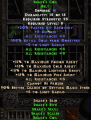
- Snake’s Set Belt

-

- Snake’s Set Helm

-

- Snake’s Set Armor

-

- Snake’s Set Gloves

-
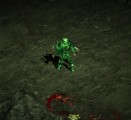
- Snake’s Set
 12.6K
12.6K
Fixed Font Mod
Fixes the 5 looking like a 6 in one of the game’s fonts
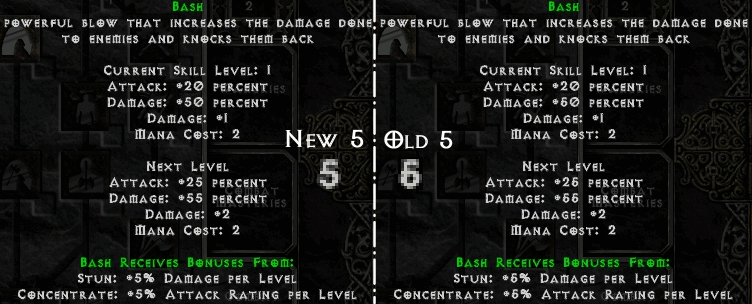 This mod merely fixes the game’s 16pt font (used on tooltip descriptions mostly) so that 5’s don’t look so much like 6’s.
6.41K
Easy Socketing and Respec
This mod makes it much simpler to manage socketed items or respec your character.
Adding and removing sockets employs existing Horadric Cube recipes but with more common ingredients. Items with existing sockets can be rerolled with the add socket recipe as many times as desired, but the number of sockets can not exceed the item’s limit and any existing socketed gems will be destroyed in the process (prevents a crash condition). In the below recipes, any mention of gems should be understood to mean any combination of either gems, runes, or jewels.
- Add 1-3 sockets to an item (weapons, shields, helms, armor): item + three gems + one identify scroll
- Remove gems from an item (destroys gems, preserves item): socketed item + one town portal scroll
- Extract gems from an item (preserves gems and item): socketed item + one (sacrificial) gem + one town portal scroll
Respecing a character will reset all the stat and skill point allocations. To respec, purchase the “Token of Absolution” from Akara in Act I and then use it.
3.18K
No Intro Mod
Replaces the intro videos with short, blank ones that don’t waste your time
3.13K
No Equipment Loss on Death Mod
This mod removes the endlessly frustrating death penalty where your equipment is put on your corpse, often forcing you to have to retrieve it in the midst of a swarm of tough monsters. Gold and XP penalties still apply.
3.3K
2.47K
Changelog
9/6/21
-added new socket recipes and changed respec to a purchasable in Easy Socketing and Respec
5/13/17
-updated No Equipment Loss on Death Mod to 1.14d
5/11/17
-all mods tested with 1.14d and updated where required
-fixed bug with Demon Hunter Class Mod where act 2 mercs couldn’t use their skills
2/18/15
-added Demon Hunter Class Mod
2/3/15
-added No Equipment Loss on Death Mod
12/18/14
-added Easy Unsocket and Respec mod
12/15/14
-added No Intro mod
10/29/14
-fixed text in Balanced Better Drops mod
7/15/2014
-updated Balanced Better Drops mod to add class-specific item gambling and bonus set
2/21/2014
-updated for patch 1.13d
4/17/2010
-updated for patch 1.13
1/27/2009
-initial release for Diablo 2 1.12






Hi Snake;
Coud you tell me how to increase drop of runes?, I know that I have to change file treasureclassex.txt but I don’t know how.
Thx a lot, and really sorry for my grammar jaja!
See http://www.snakebytestudios.com/projects/mods/diablo-2-mods/comment-page-1/#comment-3372
Hm..I recently reinstalled Diablo II and after installing all of your mods any time I tried to go from the character screen to the game I get this http://i.imgur.com/feIdxcT.png
Dunno…error message doesn’t really tell me anything, unfortunately. I would suggest removing all mods and reinstalling them more carefully. Also, make sure you have the right version of D2 for the mods, which is 1.13d.
I installed them correctly. I just forgot you needed to go online to get the update x.x *sigh* lol
There seems to be a bug with the Demon Hunter mod. With it installed I noticed that Act II mercenaries will never activate their auras, no matter what. It happens only with the mod installed, and once I remove it they work just fine. The problem happens while playing with any class, not just the Demon Hunter.
That was a bit annoying and forced me to remove the mod to play with other classes where I was counting on their auras to work, but other than that it’s a great mod, good job and keep it up.
I actually noticed this as well when I was playtesting, but I thought it was just a problem with the game since I didn’t modify anything to do with the hirelings. However, I did mod some aura-type stuff, so you could be right. Will definitely look into it. Thanks for the feedback.
This bug has now been fixed.
If anyone tries the No Equipment Loss on Death Mod with version 1.13c or earlier, and it works, please let me know. Thanks.
TOA +essences were showing up as “An Evil Force”. Re-spec’s from Akara were blanked out. patchstring.tbl dated 4/15/2009 included in the mod was the cause of this issue.
As soon as I updated patchstring.tbl file with a new dump from Patch_D2.mpq (1.13d) the problems went away.
please update this file.
Thanks for the cool mod and for introducing me to text files!!!!!
Yes, I’ve already fixed this in my working copy of Balanced Better Drops. Will upload new version soon. It’s basically just more balancing. I felt like the drops needed to be a bit better and the gambling needed worse odds.
sorry got ahead of my self… this effects – Better Balanced Drop mod –
Hello snake.
I have 2 questions
1 when can we expect the demon hunter class mod to be finished
2 how did you make/ add the sakes skin set yo the game usings drops and all
I have hero editor so I cab make set items but they can only be added using the editor which kinda takrs yhe fun of collecting it away. Plus I cant really fix the arts (admitted I have yet to find the sake skin so I dont know how you did it with the skins (just now found this site)
Is there some kind of creator or something to do that?
The Demon Hunter class will be published any day now. It’s essentially done; I’m just testing and balancing.
If you want to do any sort of modding to D2, you want to read through Phrozen Keep. The color changes are achieved using chrtransform and invtransform fields. Adding new items isn’t terribly hard, but it does require editing tab-delimited text files in Excel. No special editors that I know of.
Thanks I already have a few ideas like making 2 class based sets which can be used together ^^
btw is the demon hunter a replacement for the amazon?
Or would it be added to the list?
After I added the Demon Hunter mod I noticed that the game was a lot darker. It’s almost impossible to see anything and I’m unable to increase the gamma setting now.
There was nothing in the mod that had anything to do with changing the overall game graphics, so I would suspect it was just coincidental. That is unless removing the mod’s file will subsequently fix your problem.
You might try using the Glide wrapper if you need more configurability in your graphics.
I feel silly. It had just been awhile since I’d played and I’d forgotten how dark it got lol. Thank you again for the great mod. I’m enjoying the Demon Hunter a lot.
10×10 mod is great. thank you. been saving cain and killing D since 2001 and just found your site.
For others who had trouble, you can’t just put tradestash.dc6 in your d2 directory. Put the whole file called data in there and then it works. I used 7zip (free) to open the .rar file.
I also had to go back and lookup that windows xp home is always 32 bit even though I have
a 64 bit amd processor to find the right 7zip version to use. Good luck with your old gaming rigs fellow nephalem.
How can I tell for sure if balanced better drops is working? I used it before and it is wonderful. Recently did a fresh D2 and LoD install for implementing PlugY. I added a simple -direct -txt to my PlugY shortcut after studying a previous post. Thanks!
I think the best way to determine if the drops mod is working would be to go gamble and see if there are class-specific items available like druid helm and scepters.
Kind of tough to test this until I level a bit I think. Are there level restrictions until something simple like a wolf mask will show up for gambling?
You’ll be able to see Short Staff and Eagle Orb in gambling as low as level 1. And remember that every time you gamble, the items available are randomized. So shouldn’t be too hard to find one of those two weapons if the mod is working correctly.
Hi Snake I downloaded the mods just found out the installation is made for those play on Windows. Thing is I installed a Wineskin version D2 on Mac OSX 10.9, can you give a detailed instruction on how to do it or where to put those files instead the original? I right clicked D2 icon and took a look at the contents inside but didn’t find what to backup and what to replace. Many thanks in advance. BTW totally agree D2 is the only worthy single RPG out there these days. Cheers.
I have no idea. I’m not a Mac person. Although, you shouldn’t need an emulator for it. I’m pretty sure there’s a native Mac version of the game made by Blizzard.
Battlenet safe?
No idea. If I had to guess, I’d say the font mod is the only mod which might also work while on battlenet. But at the very least, you should be able to have these mods installed but not enabled (with the command line switch “-direct txt”) and still be able to use battlenet.
Sir i have a question can we combined all of this mod into one Diablo directory and play with all of this mod in one game??
Yes, all of the mods on this page can be used together. However, if you start getting mods from elsewhere, you may run into conflicts.
Hi, me again XD. I found out that in set items there are 2 set that where not originally in diablo 2 lod, probably comes from a mod. Don’t know if you inserted it intentionally or not. Also when you drop this set piece in game they are all called “An Evil Force” because the game can’t recognize them. I resolved the problem editing Set and Setitem txt files.If you are interested in removing them the set are “McAuley’s Folly” and “Sake’s Skin”. Thx again for the mod and (again)sorry for bad english.
First of all, McAuley’s Folly is a set that comes with the game.
In the most recent version of my drops mod, I threw in a set I had made a while back called “Snake’s Skin” just as a bonus. It’s a four-piece barbarian set that spans levels 8 to 50 and has some of the best attributes you can get. You might even say it’s OP, but I think it’s in the spirit of the mod. If you don’t want to use the set, then simply deleting the Sets.txt and SetItems.txt is all it takes.
Good call on mentioning the text being wrong, though. I did forget to include a file that contains the item strings. I’ve updated the download to include this file.
Shyam and Snake I have a question, I added a few gems to my game, from what I have found they are working properly but they are also called an Evil force, any tips on how to fix it?
None of my mods add gems. What gems do you speak of?
In general, this happens when entries are missing from the localized string tables (.tbl files).
They are self made XD
so I need to look for the tbl files and see how to edit those then…
well better to learn this now seeing I guess this would happen with other items and such as well XD
I wonder why this was not reported in the tutorial though…
thanks at least ^^
Thanx,they work very good.
Thank you for this great mod. I have a question about the drop mod. Did you also changed the runes drop rate? Especially high level runes, they are almost impossible to get in single player.(sorry for bad english, not my main language.)
AFAIK, I didn’t do anything to the runes. The only socketable I changed were skulls.
However, it’s really not that difficult to change the drop rates if you feel like they need to be adjusted. In TreasureClassEx.txt, I think all that needs to be done is lowering the Prob3 values for Runes treasure classes. This should make it more likely that higher levels will drop more frequently.
Came here for the roo info. Was surprised to find a few rather excellent D2 mods. Thank you!
You’re welcome.
Hmm…furry art…
…is awesome? >.>

Genius! Absolute Genius… I like the idea of a simpler, fairer and more common sense levelling system. New Druid, 1st Helm bought in a gamble boots 3 skills by a total of 6 points 😉
Thanks for the mods; I’ve been enjoying these. I’m using them with 1.13c with no problems so far (currently in Act 3).
The difficulty seems to be a bit lower than I remembered, did anyone else notice that? I’ve been running through mostly on /players 8 to boost the challenge. It’s been more than 10 years since I’ve last played, so my memory may be foggy. I have also been resetting my skill/stat points occasionally with Plugy, which probably makes it easier.
I’ve recently gotten back into playing Diablo II for lack of most other easy and fun rpg’s to play over the summer (I’ve had the battle chest sitting in a drawer for years) and I figured this time around I’d mod it a bit, and so I found these mods of yours and have to say I’m exceptionally fond of them all. Except for the leveling one. I found it’s actually more fun for me to just constantly play on 4-player difficulty in single player. It’s a good leveling boost and standardizer and it’s challenging along with all the other perks. Still, the leveling mod like the other three is still very well-done, non-glitchy, and useful, so kudos anyhow.
But I did have a question/request. With a lot of grinding and luck I’ve managed to acquire quite a few uniques and set items (some complete sets!) with the help of your item quality standardizer and especially from using gambling, but there’s something very basic that bothers me about gambling in general: You can’t get most class-specific items in gambling! Which is infuriating! Why should assassin be the only one to have the perk of allowing you to find truly good versions of her weapons by gambling? This is especially infuriating for Necros and Sorcs because you’re stuck buying wands and such from the regular vendors, which never gives you uniques or usually anything truly good (it usually requires two dozen trips out and into a town or something to restock them so they randomly crop up something good) and in general class-specific items tend to drop severely less than any other item and usually with garbage quality at that.
My question/request is basically can you make or do you know of a mod that allows Gambling to pull the seed for all items into its randomizer? Obviously I’d like to keep the clvl-specific mechanics and basically everything else for gambling, just do you know of how one might be able to get all item types available through gambling so that my assassin isn’t the only one capable of getting a ridiculous edge up over almost all the other classes?
If it’d be easier to contact me about this over email you can feel free to.
The purpose of the leveling mod was never to mess with the difficulty, it was to change the pacing. I’d assume using the monster level command to increase the difficulty will also increase your leveling frequency, though, so however you want to do it.
Regarding the class-specific item gambling, this sounds like a very reasonable request. And I have already added it to the current version of the mod. When I tested the changes, I was able to gamble every type of class-specific item that I could find. And they seemed to level up appropriately in higher difficulty levels. Let me know how it looks. I haven’t played the game in a while, obviously, so I may have overlooked something.
Well I meant that I used the /players# command because it does increase the exp monsters give and their difficulty in general, which I preferred to just have a more standardized leveling system, but that’s neither here nor there.
As for the mod change, yes, it works great! I’m finding all manner of class-specific items while gambling, and maybe it’s just an illusion but it seems to have generally increased the quality of item type that appears in the gambling menu in general. Which is a bonus! But on the other hand there aren’t any wands, scepters, or staves showing up while gambling, which is a big part of what I was really trying to dig at with my request. I mean I didn’t quite say that outright, so I’m definitely not saying it’s your fault, but I meant wands/etc. being included in ‘class-specific items’ since they’re really truly useful only to certain classes.
I do appreciate you dealing with this as quick as you did however; never had a modder reply to me so quickly, let alone make the changes immediately! If you could tweak this one last time to include those items as well then I’d really appreciate it!
You’re right, I only looked at the class-specific items previously. So I went back and compared all the available weapons and armor to the gamble list, and found that wands, staffs, and scepters were also not included in gambling. This is now fixed.
It works! They’re all there, scepters, wands, staves, pelts, helms, whizzbangs, snozzberries, you name it! Wands only show up once every dozen rolls or so but I think that’s just my game screwing with me. Thanks so much for the help! Now I have more of a reason to use my cash! Well, more than I did before gambling on complete garbage 😀
Hey snake, I was wondering if you’d rework your drop mod to 50% magic. I’m playing LAN with some friends and we wanted to speed up the general pace of the game. Your mod is one of very few that are balanced. Thank you for your work regardless.
Not sure how increasing the magic item drop rates will increase the pacing, but it’s been a while since I’ve played so you could be on to something. I tried playing Diablo 2 a few weeks ago, but it’s hard to put up with the clunkiness of D2 after you’ve played Diablo 3. But then again, you can’t LAN party with D3.
But it’d be pretty simple to make this modification yourself. Just open up the ItemRatio.txt file from my mod in Excel and change the values under the “Magic” column. Lower values increase the drop chance, so to get 50% more magics you’d make it 23 (34 divided by 1.5). Note that this will also lower the amount of high-quality normal items, though. Good luck and enjoy. 😉
Hi please explain the method of modding magic, sets uniques etc !?
Yeh, I’m not going to give a tutorial on modding in the comments. Try this site instead: d2mods.info
Is there any way to tinker these mods to work with Plugy (D2MultiRes)?
Adding ” -direct -txt” to the Plugy shortcut’s target field doesn’t seem work.
Wasn’t really sure myself, but I found this by googling which says it works fine: http://d2mods.info/forum/viewtopic.php?f=4&t=59639
Some of these executable mods (that need launchers or have modified dll or exe files) require different versions of the game (usually not the most up to date). So consider that also when you’re trying to get mods to work together. At the moment, my mods are all up to date with the latest version of Diablo 2.
Aaaaaand it works now!
Thanks for your help and for these little tweaks.
Plugy/ MultiRes/ Colors MOD/ Consistent Leveling/ Balanced Better Drops and Fixed Font has been merged flawlessly.
Wish me some luck with my HC Zealot! 😉
Sounds like a recipe for awesome. Enjoy.
i don’t know how to get mods, if you could make a tutorial that would be awesome
if you can download any of my mods and extract the readme, that will tell you how to install each mod.
thx for mods mainly for letter fix mod
10×10 doesn’t work for me. Stash displays as 10×10, but I can’t put any items outside the original 6×8.
Thanks for the font fix though, excellent.
i think i heard that from someone else as well. probably related to a recent patch. damn Blizzard and their frequent patching of a 12 year old game. thanks for the report.
Thanks for the fives looking like 5 and not 6 fix, been annoyed by this for many years. Only wish I’d found your mod sooner.
True dat, friend. You’re welcome.
10×10 Stash seems like it could be very useful.
Thanks for the font fix! Makes reading those damn numbers a lot easier.