One thing I really despise in video games is their occasional over-reliance on bodily sounds like breathing and heartbeats. I find it distracting or perhaps even unsettling. I don’t need to be reminded of how my body is working while I’m playing a game, thanks.
Many years ago, I made a guide on how to remove the heartbeat sounds found in Sniper Elite v2. And just recently, I began a replay of Deus Ex: Human Revolution for the first time in about 10 years. I was dismayed to be reminded that this game also has a heartbeat sound effect in it. Although, the sound only plays during one menu for choosing aug upgrades. Regardless, I remembered during previous playthroughs that I found the sound so off-putting that I would turn my speakers down whenever I needed to look at upgrades.
Even though it’s an older game and I doubt too many care now, I thought I would still share the fix and continue my thread of removing the heartbeat sounds from games. The process is actually fairly similar to the one for Sniper Elite v2: unpack game data, find the location of the sound, and then zero out the sound data. I actually struggled a lot to find the sound’s location in the data this time around. I searched though all the extracted sound files at both the filename and data levels but wasn’t turning up anything promising. Then, I just started randomly looking through game definition files and listing all the ASCII strings in them to see if there was anything interesting. That’s when a string containing “pulse” caught my eye. It was the exact sound data I was after and in only the second file I opened—a very lucky find.
How To
To employ this fix, you will need a copy of Gibbed’s DeusEx3 Mod Tools and a hex editor. The Gibbed tools will work for our purposes, but they do have a lot of bugs with unpacking and extracting audio from *.mul files into FSB (FMOD Sound Bank) files. They don’t seem to have been updated since around when the game came out.
But anyways, you’ll need to find the most recent copy of globalscaleformdatabase.drm in DXHR’s game data. For me, that was in patch2.000, but I only own the original release of the game, so it’s probably somewhere else for the “Director’s Cut” version. You’ll have to unpack the *.000 files until you find the target file so you can then edit it. Do this by running the Gibbed.DeusEx3.Unpack program from the mod tools in a terminal. Then look for globalscaleformdatabase.drm in the extracted files under default\pc-w. This file is likely compressed at this point, so you’ll need to extract in using the Gibbed.DeusEx3.DRMDecompress program next. It will overwrite the original file. Open the decompressed file in a hex editor.
Now, you only need to search for the magic words “Augmentations_Pulse_preencode”. I can’t tell you a specific address to find it, of course, because it would be different for different versions of the game (or modded versions). Once you’ve located the sound name, the simplest way to remove the sound is to just “zero it out”, which has the effect of making it complete silence and also doesn’t upset the length of the sound or the data structure of the encapsulating file (modifying either could be potential sources of game breakage or instability).
Now, you could just assume that the sound data starts and ends at the same place as in my version of the file. It would save a bit of work decoding the headers, but could cause crashing if it’s wrong. But if you want to try this way first, I don’t blame you. The data starts directly after the name string (looks like the name strings are truncated at 30 bytes, so the “wav” is cut off at the end) and then goes for 15392 bytes—see the area highlighted purple in the screenshot below.
However, if you’d like to be certain of which bytes are the sound data (or the easy method failed), you’ll have to decode the second and third integers of the header. Recall that integers are 4 byte long numbers. Also, the file is little-endian, which means the bytes of the integer are in reverse order. The first four bytes of the header are a string “FSB4” identifying the data as an FMOD Sound Bank. The first integer after that is unimportant. But the second integer is the length of the header. For me, this value is 80 (0x50) bytes. So, starting at “FSB4”, pace out however many bytes you found the header length to be. This point is the start of the sound data.
Then, you’ll look at the value of the third integer to get the length of the sound data. For me, this was 15392 (0x3C20). So, starting at the end of the header, pace out however many bytes you found the sound data length to be. This point is the end of the sound data. Now that you have the sound data selected, you can fill these bytes with zeros. But that would take far too long if simply holding down the zero key on the keyboard. Instead, look for a “fill with zeros” or “fill with value” or “overwrite bytes” function in your editor, and use this to transform all the sound data to zeros.
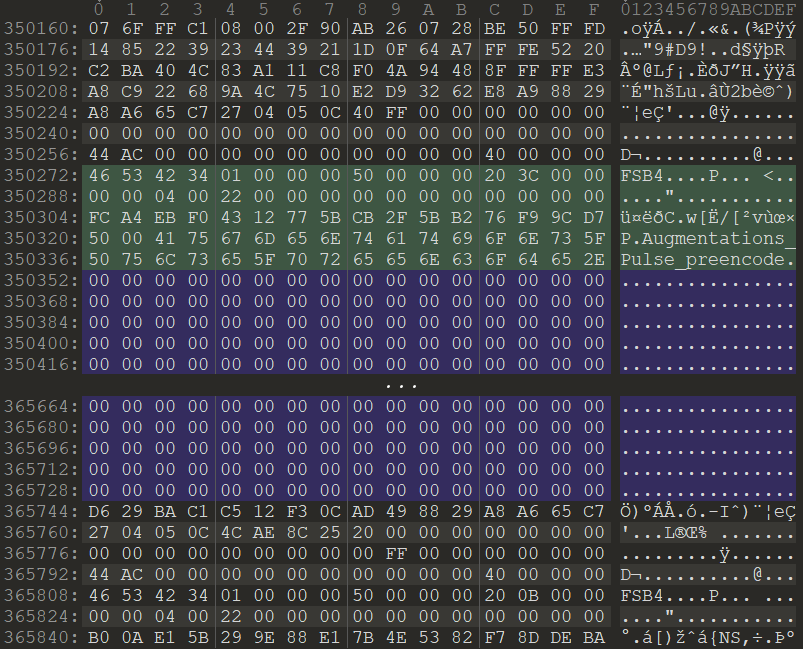
After filling the sound data with zeros
That’s all the editing needed. Just save your file. Then, use Gibbed.DeusEx3.Pack to recreate the .000 archive so the game can read it. I would not recommend repacking bigfile as it is very large and anything less than perfect recreation could cause crashing. Instead use a patch file, or if you have the Director’s Cut version, use the Gibbed Mod Hook for this. My understanding is that you only need to point the packing program to a directory containing the single modified globalscaleformdatabase.drm file in this case.
However, if like me, you use the patch2.000 archive to hold your modified file, then don’t be alarmed if the size is drastically larger than the original; recall that we decompressed the target file earlier. Luckily the game engine doesn’t mind if the files are compressed or not when loading.
Then just copy your modified .000 file back to the game’s directory. And enjoy the bliss that is not having a heart beating in your ears when you’re just trying to read upgrade descriptions.
Downloadable Mod?
I know you’re wondering way I don’t just create a simple pre-built mod that I can easily share and is also easily used. While I would love to do this, there are many reasons discouraging such a thing. For one, the only mod loader for the game is oddly enough only for the Director’s Cut version, which I’m not sure is a version I want to play (with no discount to purchase for original game owners). And also, the file that needs to be modified is one that frequently gets modified for other mods since it’s responsible for all the UI, so that would lead to mod incompatibility. And finally, as I said before, this is probably a very niche mod to begin with and thus without large appeal.