Fixing a Playstation 2

(This post was originally part of the previous one, but I felt that it was too long and two separate topics.)

Here’s an example of a project that I couldn’t post on until it was resolved. Over winter break, Kaylen decided to open up her Playstation 2 and blow on the DVD drive lens to fix read errors. Even though she was following an Internet guide, something happened that made the PS2 unable to power on when reassembled. So I told her not to worry because I would fix it when we were next together–even though I’d never even seen a PS2 up close before.

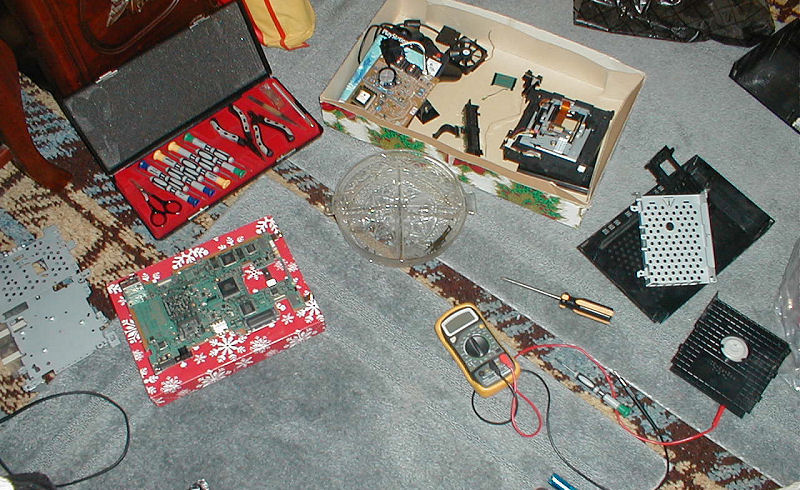
Initial speculation on the power problem was the awkwardly positioned power and eject buttons and cable which Kaylen had torn out from the mainboard upon first opening the case. We tried numerous ways of repositioning the cable into its connector and the red standby light would come on but not the green power light. I’m not sure if I was driven more by the need to troubleshoot the device or just take it apart, but I proceeded with further disassembly so that I could test the power supply fuse and current. Although there was a mishap with shorting some AC power, the fuse and current tested fine.

At this point, I was stumped as most of the “ultimate PS2 repair” guides dealt mostly with disc read errors and I couldn’t even get it to turn on. After hunting around on Google for a while, I came up with an awesome find, though…an official PS2 service manual complete with exploded views, detailed electrical schematics, block diagrams of the architecture, printed wiring board diagrams, parts lists, and even a disassembly guide. This thing was so detailed that it even had the functions of the individual pins on the ICs labeled; you could practically build your own PS2 with this manual in hand. (I put together a collection of all the manuals and guides I used with restrictions removed here. Hope they can help someone, but shhh…don’t tell anybody.) I used this to further test some of the possible problems such as all the fuses on the mainboard, the power supply output (the pinout is 12V, 12V, GND, GND by the way), and even the circuitry for the power button and cable–all were fine.

Defeated, I started putting the PS2 back together. Then, I noticed a small, transparent blue sheet of plastic that must have fallen out of the casing at some point during disassembly. Its width was exactly the same as the power button cable. Without a second thought, I shoved it into the connector with the cable and turned on the power supply. And wouldn’t you know it, when I hit the power button, it turned green and the console started to boot. It was this stupid piece of plastic that Kaylen must have dropped into the case all along. Oh well, at least I took the whole thing apart and didn’t break it–quite an achievement. Although, there were a couple screws left over after reassembly.

Even after it was running again, the disc read errors remained. I tried adjusting the tray alignment knob for hours, which had audio CDs and video DVDs working, but not game DVDs. Ultimately, all it took was cleaning the lens thoroughly with some rubbing alcohol and a Q-tip. Now Kaylen can get her dance dance dance on. I hear she’s “not an ordinary fella”.

And the moral of this story? Clean the fucking lens with a commercial cleaner disc first.

Posted in Troubleshooting | Tagged | Leave a comment

Okay, so it’s a blog.

It’s been difficult for me to admit that this is a “blog” instead of “news”, because I’m never one to follow the crowd. But I finally gave into the blog fad for a few reasons: I’m not a real company with formal news releases, I’m the only person that contributes to this site now, and people can identify with the term “blog” better.

And with the name change comes a new blog system powered by the usual PHP + MySQL and made by yours truly. So far I’ve converted the old delimited plaintext file from Coranto (an increasingly dead Perl CMS) to a SQL-type database and made a blog viewer script (cunningly named blog.php). The script takes in a number of parameters that allow one to view by specific post ID, month and year (used for archives), tag, or all posts, each with the typical page navigation controls. I still need to code the archive script and make a backend for myself, though. Here’s a list of the specific advantages I hope to gain by switching from Coranto to my own blog script.

  • Less code bloat from too many user options
  • Incremental integers for post IDs are more user-friendly than Coranto’s random string of 18 characters
  • Tagging offers an alternative method to categorize posts
  • Better display of monthly archive links
  • Custom backend will make it easier to integrate HTML into posts
  • Possibility for parsing posts before display
  • Included in the weekly SQL email backup
  • Better searching possible

While I’m on the subject of blogging, I figure I should go over my unique philosophy on it. As you may have noticed, I try to post at least once a month, lest I forget what’s been going on. I do a lot of projects in a month, so inevitably some of the smaller ones get lost in time and memory if I don’t post frequently. I could solve this dilemma some by just making smaller posts more often, but the problem with that is I’m picky. I like to have a topic fully fleshed out or even resolved before I post on it. Thus unless I do one big project contiguously (such as in my last post on overclocking), I will inevitably have a lot of variably-sized projects occurring intermittently.

Posted in Website | Leave a comment

Lessons in Overclocking

As I mentioned in my last post a week ago, I had a hunch that the CPU was the source of all my locking issues in games. Originally, I suspected the clock was too high at ~100Mhz over stock, 2158 (166*13) @ 2262 (174*13). However, while researching Athlon XP’s on Wikipedia, I noticed that none of the Thoroughbred’s were set above 1.65 Volts, yet I had mine set to 1.70 Volts for years. I can’t recall now why I set the core voltage up .05v; it could have been that my original overclock demanded it for stability, there was a perceived need for increased voltage for better stability, or just my own ignorance at the time. It seems reasonable that the voltage is responsible partly, if not completely, for the instability. Increasing the voltage is often necessary to maintain higher clock rates, but they also add to the watts of thermal energy the CPU puts out (increasing the likelihood of overheating). It is also my speculation that increased voltage puts more demand on the capacitors that regulate the CPU power, potentially causing over-voltage failure, and it just so happens that I noticed a couple slightly burst capacitors recently (as seen in the photos below)–wondering if there’s a correlation.

Since I still couldn’t be sure if the problem was the core voltage or not, I was planning a battery of tests the day after Christmas to find a suitable CPU clock. I’d recently realized that my chipset and memory were both rated for a 200Mhz front-side bus, but I had been keeping it close to the CPU’s default of 166. Luckily, I got my 2700+ a couple months before AMD started locking the multiplier by default; therefore, I would be able to drop the multiplier and raise the FSB, roughly maintaining the CPU clock while increasing the memory bandwidth. I was hoping this strategy would allow me to lower the CPU clock as much as necessary and make up the performance with increased bandwidth. The only unknown factor was possible increased CPU latency due to the lower multiplier.

I spent five or more hours running through my test battery, which consisted of Sandra 2005 CPU Arithmetic, CPU Multimedia, and Memory Bandwidth tests; some or all of 3DMark 2005’s game and CPU tests; and the Half-Life 2 benchmark (which apparently is only available through Counter-Strike: Source now). 3DMark’s GPU tests were understandably unhelpful, except later on when I discovered that the Firefly test was extremely memory-intensive. As I tried to find the maximum stable FSB clock, this test proved most helpful. Half-Life 2 showed little responsiveness to the increased memory bandwidth and was only slightly more affected by the CPU clock, even when the video card wasn’t the bottleneck. Sandra’s tests were the most consistently telling of raw performance. As expected, memory bandwidth scaled quite linearly with increased FSB clock. And although the multimedia benchmark was mostly useless, the arithmetic benchmark showed slight performance degradation due to a lower CPU multiplier; but in the end, it was much more affected by CPU clock speed.

Tnews250he benchmarking sequence I took was to decrease the multiplier by .5 each time and then bring the FSB up until the CPU clock was about 2200Mhz. However, when I reached 11*200, I noticed that HL2 and the 3DMark were exhibiting strange crashing. I tried lowering the FSB until I brought these crashes under control (~190Mhz). However, at 11.5*190, the CPU clock was too low, so I raised the multiplier to 12 and set the FSB to 186Mhz for a comfortable 2232Mhz. This has proved to be very stable over the last week, so my next move is to bump up the FSB to 188, which would bring the CPU clock to nearly the same as it has been for the last few years and ultimately show that the core voltage was the problem all along. All these tests were run with a core voltage of 1.65v (stock).

The only problem with using a multiplier of 12 instead of 13, is that most programs identify my CPU as a 2400+ instead of 2700+. But really, it’s more like a 3200+ in terms of performance.

I’ve been enjoying my new stability by playing through Half-Life 2 Episodes 1 and 2 in the last week. Yes, episode 2 was that good that I wanted to play it again. It was much easier to appreciate the game without random locking and with commentaries turned on. I was surprised how often Valve mentioned changing the game in response to the actions of playtesters. This seems like something more developers should pay better attention to.

Posted in Benchmarking, Hardware, Troubleshooting | Tagged , | Leave a comment

A Special Happy, Fun-Time Holiday Post

As is customary for an after semester post, I will say how the semester was a bitch and report my grades. Well, it was a bitch, and I didn’t get anything below a C, so woot. The biggest bitch part was a recommendation report for an BS required English course; unfortunately, it was a group project and I chose a topic that my group was completely incapable of working on: parallel computing. Although a couple sections are missing, the paper is in a refined enough state that I’ve decided to post it here. I’m now a self-taught expert on parallelism, at least.

On my final exam day, CNET Download.com finally got around to approving my submission of Cursor Lock 2.0. It got a couple hundred downloads in the first few days alone, but has since slowed down to about 20 downloads a day. Of course, I never really expected it to be a hot, must-have app; it’s more of an awesome, there when you need it app.

For my next programming project, I’m looking into finally doing a Trillian log converter, which I first mentioned this time last year. Trillian’s native bastardized XML format does not scale well (the more you chat with someone, the longer it takes to access their log) and can only be read with the built-in log viewer. I think that any features which necessitated the use of a proprietary log format over HTML format are of questionable value. I’m sure I can replicate all of the most important features in simple, universal HTML format: bookmarks, search (via Google Desktop Search or something similar), calendar (from splitting into different files by date), and masking different message types (through some delicious CSS and JS). It has the added benefit of extensibility, too; I plan on giving all the page elements their own class, so users can change log formatting to suit their preferences.

news247

Duber the pet monkey from Siberia says hello.

I’ve only written a specification outline for the program so far. Mostly, I’ve just been relaxing to some gaming. The AOE3 expansion, Asian Dynasties, has renewed my interest in Age of Empires. I skipped the War Chief expansion because, frankly, I’m tired of fucking Indians. But the added map locations, high-level home city cards, and civs of Asian Dynasties is just what the game needed. Although China’s unit training differences are too odd for me to handle, Japan has really killer unit upgrade cards plus powerful units already that compliment my turtling style.

Of course, I had to play Portal and Half-Life 2: Episode 2 also. Portal was so fun that I finished it in one sitting 😕 –it was a truimph. Episode 2 was also pretty good; there are some really intense firefights and well-crafted environments. However, as with Fortress Forever, locking issues started creeping up again. Lowering the sound acceleration in dxdiag seemed to make some difference in the time it took to lock, but ultimately they were still completely random. Monitoring component temperatures showed that the CPU temperature was a little high (but still nowhere near the 140F I reached over summer), so I cleaned the HSF out again. That further decreased the frequency of locks, but alas the problem remained with Source Engine games. My latest hunch is that the CPU is just getting tired of the overclock of 100Mhz (2.15 to 2.25Ghz) I imposed years ago. So I’ve been lowering that by half with nVidia’s old nForce2 system utility before playing. So far, results have been promising.

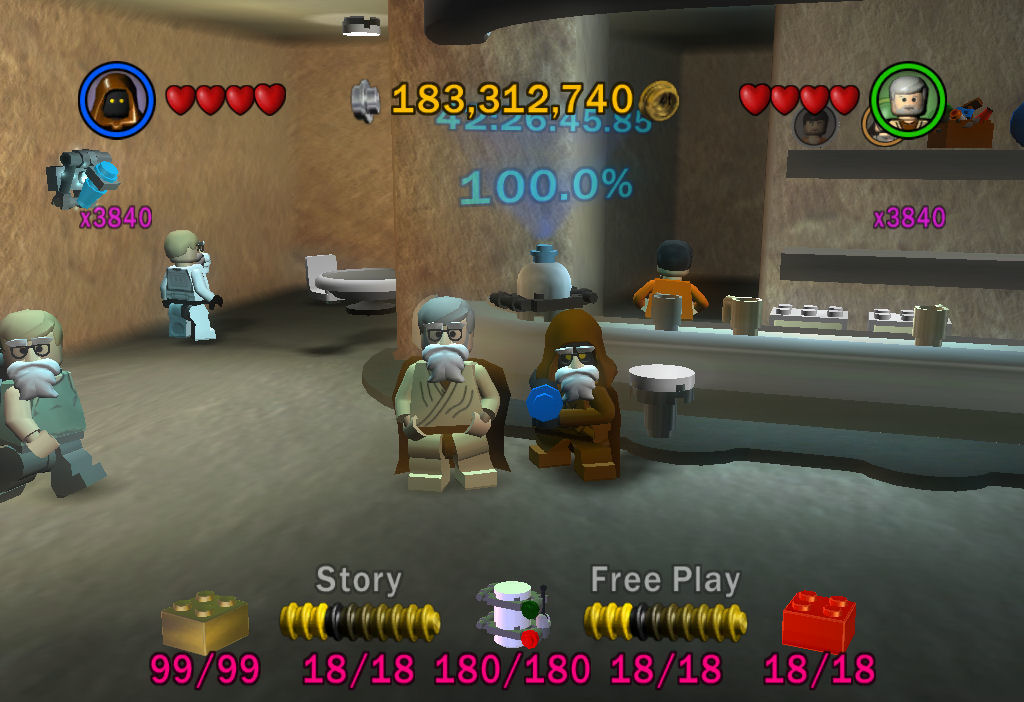
As for games that don’t lock my system up, Kaylen and I finally reached 100% completion in both Lego Star Wars games during her recent visit. It’s clear that the second game is by far superior, but going back and playing the first game from the newer trilogy was still kickass lego fun. Next year: Lego Indiana Jones. Oh, hell yes.

news246

Lego Star Wars

news245

Stud fountain with 3840x score multiplier and Santa disguises.

Posted in Gaming | Tagged , , , , , | Leave a comment

Cursor Lock Optimizations

My recent major version of Multimon Cursor Lock was pretty CPU efficient, using around .15 to .3 seconds of CPU time after two minutes with a poll rate of 20ms. Still, I was noticing a large number of page faults while the program was polling–about 100 for each poll. Page faults occur when a needed “page” of memory is not currently in physical memory and thus needs to be loaded back in from the page file (swap space on a hard drive). Of course, page faults are not fatal, but they do lower performance.

Tonight, I finally decided to investigate the page faults and see if there was any fix. It was really as simple as watching Process Explorer’s process performance tab while stepping through the code. It didn’t take long until I found the culprits: CreateToolhelp32Snapshot() and Process32Next(). (I use these functions to enumerate the processes on a system. Of course, using EnumProcesses() would have been a better way, but that API function is only available on 2000/XP+ and I wanted to support as far back as 98.) Creating the snapshot requires at least 20 page faults, and looping through each process is a few more. Since I saw no memory actually being swapped, I figure the system module that contains this legacy function must be at fault (pun intended).

Seeing that my process enumeration code was causing 100 faults every time it ran (give or take, depending on how many processes are running), I came up with a simple optimization to cause it not to be needed as much. It was basically just to allow the program to remember the ID of the process it locked to last and check if its window still had focus on the next poll. Thus, while the program (typically a game) is locked, it doesn’t need to enumerate processes and creates no page faults. When I went to look at the performance for my optimized code, I actually had trouble seeing if it used any CPU at all. Apparently, the usage is so much smaller than the performance counter’s resolution, that after five minutes of locked polling, I couldn’t see any increase in CPU time usage. Because the usage is so immeasurably small, it was amusingly difficult to say how much the performance increased for the changelog.

Also, I’ve written a new column recently; it’s in the guides section, but it really doesn’t fit that category. I’d love to rearrange my column categories to include a software one, but unfortunately the URLs for columns are based on their category. Anyways, if you enjoyed this post, you’ll probably enjoy this column as well. It’s the same kind of reverse engineering goodness that gets us geeks all hot.

Posted in Programming | Tagged , | Leave a comment

Cursor Lock 2.0 and Power Supply failures

I’ve been wanting to rewrite one of my VB.Net programs over in C++ recently, just to force myself to learn the language better. Since there was no way in hell I was going to tackle any program with a graphical user interface, I chose the locking portion of my Multi-Monitor Cursor Lock to port. Looking over the code for a recent feature-request update, it seemed like most of the code involved Windows API function calls and data types, which are actually easier to implement than in VB (you just have to include windows.h).

Really, the two most difficult to learn fundamentals of C (having come from a VB/Java/PHP background) are character strings and pointers. Pointers really aren’t that bad once you learn how the operators work, but you still have to stop and think about any redirections: “& returns an address, * returns a value”. The problem with strings is that there are a million types of them and getting them to play nice requires all sorts of tricks; there’s character arrays, pointers to characters, constant version of both of those (which I still don’t really get–how can something return a constant?), string class, cstring class, wide characters, ANSI characters, Unicode characters, multi-byte characters. Since I wasn’t using MFC or ATL, I decided to stick with the string class, which could be initialized from character arrays or character pointers. And although its c_str() function returns a const char *, you can use strdup() or strcpy() to easily get a char *, which many API functions require.

After trudging through the code for parsing the command line switches in and reading default values, the code for the actual locking portion just kind of rolled out (being comprised almost completely of API calls). Doing the code was fun, but the benefits that I

news241

Testing Cursor Lock compatibility required me to install Win98 in VMWare.

saw during performance testing blew me away. I ran the VB.Net and C++ versions for two minutes at 20ms poll rate to see the CPU usage. .Net used 8.6 seconds of CPU time compared to C++’s .3 seconds: a 29 times performance increase! This test couldn’t have been more definitive as the algorithms were virtually the same; remember, I said the locking portion was mostly system calls. Then, I tested memory efficiency, which was also delightful but the difference was less dramatic: ~16,000KB to ~1,500KB (~10x less memory) or ~7,000KB to ~400KB (~17x less) using the SetProcessWorkingSetSize(hProc, -1, -1) trick–not too shabby. Also, without the .Net “Just-in-Time” compiling, the C++ version doesn’t have a two to three second start and close delay.

Happy with my results, I started working on new documentation for Cursor Lock 2.0, so I could submit to some download sites. It was about complete when I decided to turn in for the night on Saturday. As I laid in bed, nearly asleep, I heard the fans in my computer spinning down, the silence cutting through my subconscious. Peering over at the tower, I noticed the power light still on, which was even odder than the system randomly powering down. I went over and tried to restart, but it wouldn’t stay on long enough to even begin to news242POST and blue smoke smell had already permeated the room. The next morning, I smelled around the tower and found the culprit to be the power supply, as I suspected. After taking the PSU apart and dissecting it on the kitchen table, I found an interestingly charred transformer coil. When I plugged the PSU in and shorted the power-on pin, a spark leapt from aforementioned transformer to a plastic insulation divider. Upon further inspection, it appeared the divider had actually melted to the transformer.

Obviously, this power supply was dead beyond anything I could repair, so I ordered a new 500W Thermaltake PSU from Newegg. I tried to get one that I could still use whenever I finally get to upgrade my core system components; the key to this was in the 20+4-pin ATX main connector that allows you to break the newest 4 pins away from it. In retrospect, I had probably been overloading the old PSU for a while now, which was leading to some system instabilities when gaming. It was rated for 350W, but most wattage calculations I had done put my usage at slightly above that. Anyways, here’s some pics of the new power supply. I should have gotten one with it inside the case, but oh well…some other time.

Luckily, after that disaster, none of my other hardware had been fried (from an over-voltage or such), and I got to finish the documentation and polish of the new Cursor Lock. I submitted it to a few download sites, but it could be weeks before they get approved. What independent developer has $1000 for their premium services? Not to mention that there are thousand of good download sites on the web. Well, until it appears on other sites, the new version can be found right where it always was here.

Posted in Hardware, Programming | Tagged , , | Leave a comment