Maximum phatness is the theme for today’s post. First, I’ll start off with something that anybody can do and looks really awesome afterwards. If you have an OEM computer, you’ve probably seen that company’s gay logo and name in your system properties (mainly in the system properties in the control panel, but some of it will appear in the System Information program under Start>Programs>Accessories>System Tools).
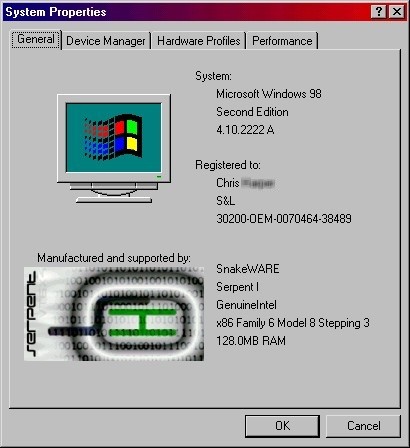
Ok, begin by downloading this file if you don’t have a OEM system, or even if you do, you may want to start with blank templates. Make sure to extract to the Windows>System directory. The file “oemlogo.bmp” is the logo that will appear in your system properties. It should not change from the template size and color depth of 180x114x8. The template’s transparent color is red, but you can change it to whatever you want (just make sure any parts you don’t want seen are transparent). The file oeminfo.ini is pretty straight-forward, just don’t use any quotes around the information you entered. Here’s what my system properties box looks like:
Now for something whacky…I wrote up a Mini-Column with a few pics for a segment that you may have seen on other hardware sites; but I am going to call it Snake’s Ghetto Hardware Modifications. Unlike at Icrontic (formally Apu’s Hardware), though, my mods will hopefully actually work. So, check out my first installment here.