Author Archives: Snake

New Cursor Lock Live

Cursor Lock 2.6 went live yesterday.  Funny enough, I didn’t actually need to change anything but the version number in the lock program itself; that code is proving to be very solid.  But the setup program seems to need constant fiddling since it actually has a GUI.  I’m always trying to make it easier to understand and use.

The biggest change in this version is native support for Windows 7.  I achieved this mostly just by switching to Visual Studio 2008 and compiling for .Net 3.5, but it also needed a small amount of UAC tweaks.  Another major change is to the context-based help system, which used to be in a big, ugly textbox on the side of the window.  Not only was it ugly, but it gave me a limited amount of characters to work with.  In the new version, I’ve switched to a tooltip system that is activated by right-clicking on the feature in question.

And the last big change is something I’ve never done in a program before but became increasingly aware of its need after seeing all the hits and comments on Cursor Lock I get from around the world.  That’s right, it’s localization, or in layman’s terms translations.  I’ve already added a bunch of languages to the installer but have also added support for translations in the setup program.  I’m hoping some native speakers will contribute their translations, but I may do some computer-generated ones if not.  Full changelog below.

  • support for Windows Vista/7 and UAC
  • cleaned up help text
  • added support for translations
  • icons and other UI improvements
  • moved context-based help to tooltips
  • converted project to .Net 3.5
  • logging is now disabled by default
  • updated links
Posted in Programming | Tagged , , | Leave a comment

Cursor Lock 2.6 in the Works

I’ve wanted to do a massive update to Cursor Lock for a while now, but figured I’d scale that back and just fix some lingering bugs for now.  As you can see from the screenshot, I’m also working on better support for Windows 7.  Probably done in a couple weeks.

Cursor Lock 2.6 WIP

Cursor Lock 2.6 WIP

Posted in Programming | Tagged | Leave a comment

Serpent 4

Serpent 4

Serpent 4

About a month ago, I decided that I would upgrade my desktop computer’s core components (CPU, motherboard, and RAM) because Serpent 3 was getting increasingly unstable, and Memtest wasn’t coming to the rescue this time.  At the same time, I figured I should probably “upgrade” my OS to Windows 7 since everything seems to be switching over to it now.  Watch the video below to see the build in action.

So the hardware of Serpent 4 is working out flawless so far, but the operating system is constantly disappointing.  The main trouble early on was that I kept getting the dreaded “display driver stopped responding” system freezes but only when using Firefox.  Googling this gives you infinite solutions, but the one that worked for me was just downgrading the nVidia drivers from 320.18 to 310.70.

In general, there’s too much that’s really annoying about Windows 7 and not enough to actually like.  A few things I do like, though:

  • Libraries are kinda cool, I guess
  • Not being limited to 3.25 GB of memory is very cool
  • Task Manager on steroids–even saves your sorting
  • Pin to Taskbar can be useful
  • WebDAV remote folders work seamlessly
  • Resizing thumbnails in explorer is occasionally helpful

And that’s pretty much it.  As far as things I don’t like in Windows 7, most of them fall into the category of needlessly changing things (e.g. making it more “user-friendly”) such as the entire network connections control panel, not displaying drive free space in the explorer status bar, the lameass search box in explorer, etc.  And the UAC… I really wanted to believe you might be helpful sometime, but after a month of dealing with your bullshit, I couldn’t take it anymore.

But at least I’m getting to play Company of Heroes 2 now, so I guess it’s all worth it.

Posted in Hardware, Software | Tagged , , | Leave a comment

Fixing a Gamepad Cable

Within a couple weeks, I had the misfortune of having two gamepads that I’d had for years both die on me.  One, a Logitech Dual Strike, clearly had its cable split open and one of the wires severed.  The other, a Microsoft Sidewinder Plug & Play, just started crapping out randomly then suddenly died for no apparent reason, but it was well over a decade old.

The cable on the Dual Action split right at where it went into the gamepad itself, so there was no room to strip and then splice the wires together.  And the Sidewinder I had no hope of fixing without a multimeter and some luck.  So given that I knew what was wrong with the Dual Action, I decided to sacrifice the Sidewinder (which I unfortunately liked better) to save the Dual Action by replacing its cable with the one from the Sidewinder.  Plus the Sidewinder’s cable had reinforcement at the base of the cable to keep it from splitting there—would have been nice if Logitech had thought of that.

After I opened up the gamepads, I noticed two things different about their USB cables.  The Sidewinder’s cable connected to the PCB using a crimped wire terminal (you know, the plastic ones with the reconfigurable pinout) whereas the Dual Action’s cable was just soldered to the board.  Also, the wires were in a different order according to their colors.  I decided to take advantage of the terminal on the Sidewinder so I could easily rearrange the wires if I got the pinout wrong.

Sidewinder PCB

Sidewinder PCB

Removing the terminal took forever since I didn’t have a solder sucker.  I found out that copper has the ability to absorb solder, though.  So, I cut open an old AC cable, striped a wire, and used that.  It actually worked pretty well once I got a technique figured out.  Once the solder liquified, I jabbed the tips of the copper cable in there and rubbed it around, making sure to remove the copper before removing the iron (or the copper gets soldered to the PCB, naturally).  Also, I had to hold the copper with pliers as it’s a great conductor of heat.

Removed terminal and copper wick

Removed terminal and copper wick

The rest of the soldering went a lot smoother.  I removed the split cable from the Dual Action, then put the terminal in its place.  I just used the solder that held the wires in place to hold the terminal as well.  Finally, I changed the order of the wires on the USB cable so they’d match up to the order that the Dual Action wires had.  Assuming the USB cable wire colors are standard, it should work (again, I didn’t have a multimeter, so I couldn’t check).

And as the video below shows, it did work.  However, getting the covers back on was a little tricky.  The plug that holds the cable in place as it enters the cover was a little large on the new cable.  But trimming the plug a little with scissors and expanding the opening with an x-acto knife was all it took.  The repaired gamepad made it through two hours of Zelda on Snes9x with no problem.

Posted in Hardware | Tagged , | Leave a comment

10 Years in Video Cards

I was cleaning out my spare computer parts yesterday and realized that I had saved every video card I’d ever owned.  So I thought I’d take some pictures before I chucked them and present a history of video cards.

Pile o’ Video Cards

Diamond Viper II (2000 – 2001)

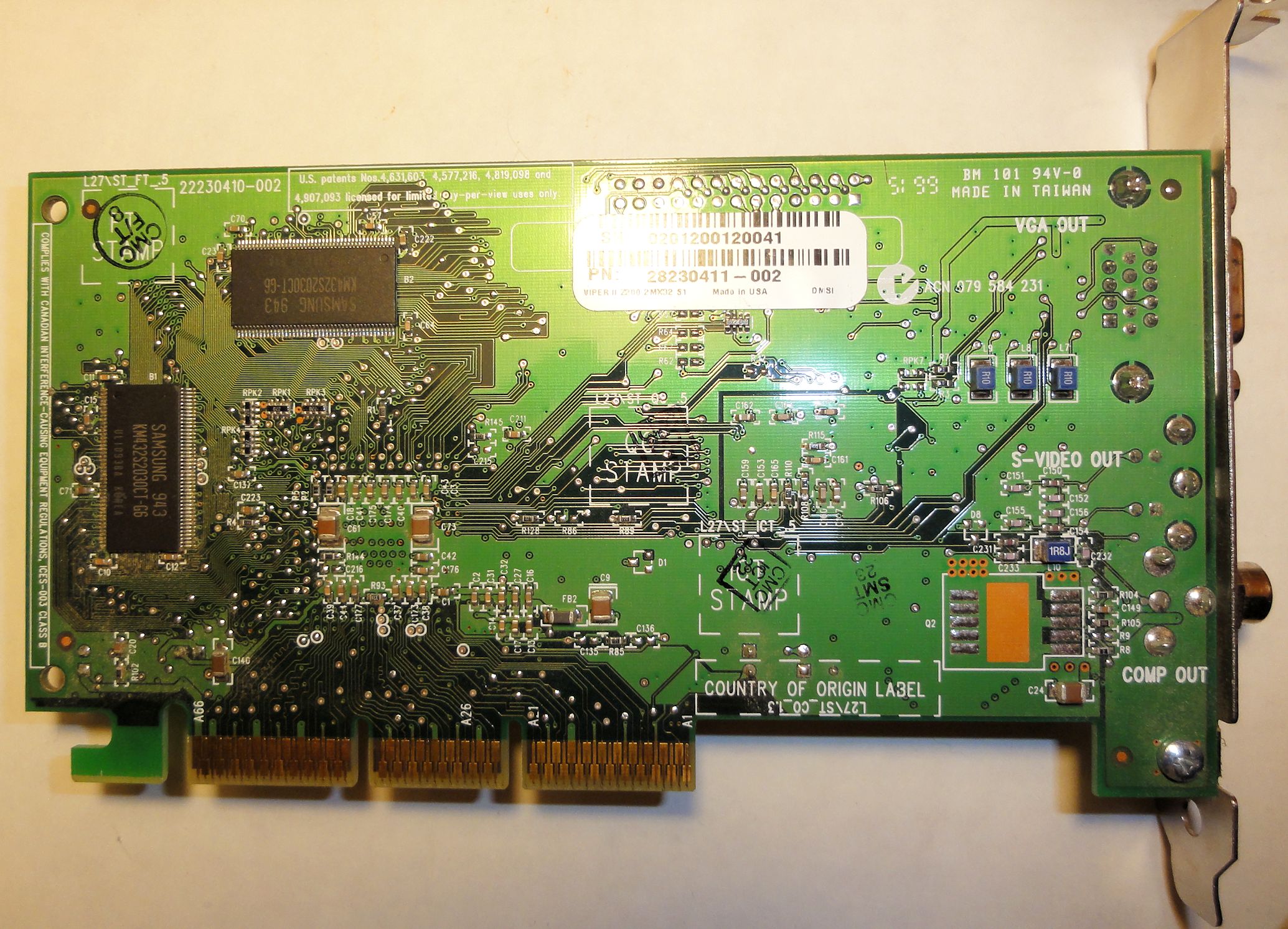
My first video card ever, I bought this primarily for playing Team Fortress Classic (a Half-Life multiplayer mod) and Unreal Tournament.  And at those two games, it did quite well.  According to Wikipedia, the Viper II had a mere 12 million transistors and a core clock of 125Mhz.  I was surprised to see that it came with composite and S-Video connectors for outputting to TV.  You’ll also notice its lack of a fan.

Geforce 2 Ultra (2001 – 2004)

The Geforce 2 Ultra was twice as powerful as the Viper II at a transistor count of 25 million and a core clock of 250Mhz.  This card helped me battle my way through classic games of the time such as Jedi Knight 2, Dungeon Siege, Deus Ex, Grand Theft Auto 3, and Rise of Nations.  This was the only time I bought a high-end version of a video card.

Later in this card’s life, I put it into a rig I built for my sister, and she of course mistreated it.  Hence the fan on the video card seized up and fell off.

Radeon 9600XT (2004 – 2009)

Weighing in at 76 million transistors and a core clock of 500Mhz, the Radeon 9600XT was an excellent video card that held its own right up until 2008 when Shader Model 3 games started coming out.  During its reign, I was enjoying games such as Half-Life 2, UT 2004, Company of Heroes, TES4: Oblivion, Counter-Strike: Source, and Dungeon Siege 2.  Starting with this video card, I also began using dual-monitors and haven’t looked back since.  I modded my card to add copper heatsinks on the RAM chips and later on replaced the HSF with an all-copper one.

Geforce 7300GT (2009)

This video card was really only a stopgap until I could build a whole new system.  At 177 million transistors and 350Mhz, the 7300GT was one of the last video cards to still support AGP.

Posted in Hardware | Tagged , , , , | Leave a comment

Five Games I Can’t Stop Replaying

There are some video games that are so fun that I find myself replaying them regularly.  And if my Steam gaming stats are anything to go by, I’ve logged considerable time with the following games after so many playthroughs.  I’ve tried to choose games that are all fairly recent here, but for a list of some great older games, see Snake’s Top Tens from 2005.

Tropico 3

The Tropico series is all about managing a tiny island nation in the Caribbean, and the third game in this series definitely does it best.  There’s something very addicting to this game in its delightful blend of economy management, city-building, and island vistas.  Because your island only starts with roughly 50 citizens, you can connect with their individual needs and preferences and fulfilling those feels very rewarding.  The near infinite combinations of variables for the presidente, scenario, and island makes Tropico 3 that much more replayable.

Company of Heroes

The accurate portrayals of World War II weapons and combat and the exceptional graphics are the two main factors that make Company of Heroes so enjoyable to play.  There’s nothing better than seeing a mammoth German Tiger tank crushing everything in its path with all turrets firing and the ensuing visceral fireballs and carnage.  And on top of this brutal combat comes a very intelligent strategy game where the balance of power is constantly shifting, keeping you on your toes.  The campaigns (Normandy, Market Garden, Caen) in Company of Heroes are great for occasional replaying, but the skirmishes are even better for a quick bout of WW2 action.  (Best if consumed with Band of Brothers.)

Red Faction: Guerrilla

Red Faction: Guerrilla is Grand Theft Auto with explosives.  Who knew that the creative destruction of buildings could make for such enjoyable gameplay.  On top of that, you feel like your actions are actually having an effect on the world as you start completing missions and freeing zones.  But mainly, blowing stuff up never gets old.  (Highly recommended to go xliveless, though.)

It all starts with a sledgehammer

It all starts with a sledgehammer

Dark Messiah of Might and Magic

Dark Messiah combines a lot of the features I love in a game.  It has great first-person combat, character development via a skill tree, plenty of loot to find and equip, sneaking around and stealth kills, and nice graphics and level design.  The combat alone is quite intense and takes some careful choreography from the player; so, executing the perfect attack is very rewarding.  All of these RPG elements combined with the combat and great locales make for a wonderfully replayable adventure.

Call of Duty: World at War

World at War is like playing a non-stop action WW2 movie.  And everything about this game is focused on keeping the action coming.  Normally I would be opposed to constantly spawning enemies in a game, but here they only force you to ferociously press on.  It’s an amazing-looking and -sounding game as well.  Even though the full game can be played in only a few hours, I find myself playing the game (or portions of it) over and over.

Posted in Gaming | Tagged , , , , | Leave a comment