File Lister 1.6 Out

The new version of File Lister is available now. Download here. Changelog follows.

  • added counters to output format with pattern %i
  • added the option to use regex capturing groups in output format with pattern %v
  • added option to match full path in regex instead of only filename
  • added option to invert matching behavior for regex
  • rewrote output format parser to be pre-compiled for speed improvement
  • optimized regex matching for significant speed improvement when using regex
  • removed default pattern option from pattern selection menu, added “Default” buttons to some dialogs
  • fixed crash if output file in use by another program
  • fixed a bug with groupings in filesize pattern
  • fixed missing use of default options for date, size, and attributes patterns without parameters
Posted in Miscellaneous | Tagged | Leave a comment

File Lister and Company of Heroes

A new version of File Lister is in beta now. I’ve been repeatedly finding it useful both at home and at work, so I figured it was the most deserving of an update. Besides a few bug fixes, there are also performance improvements, some more regex matching options, and the addition of counters and regex capturing groups in the output format. I’m hoping to release a final version within the next month. And this next release may not even be the end of the updates to File Lister as I’m also looking at adding features like command line modes in the future.

news301

Hurtgen Forest at night

I’m also trying my hardest to get my Company of Heroes map finally done (damn me and my perfectionism!), even if there’s no one around to play it anymore. It’s just too good and too close to completion to let it go unfinished. There’s just 1/8th of the playable area left to create and some of the out-of-bounds yet to be filled with trees–it really shouldn’t take but another concerted effort of a weekend.

And I’ve finally decided on a name for the map: “Hurtgen Forest“. Since my map is pretty much a fictional setting, I didn’t want to be too specific with the location. Though, I had always considered that it would probably be named after some area in Belgium or northwest Germany.

Posted in Miscellaneous | Tagged , , , | Leave a comment

Using Cursor Lock with Steam Games

See updated instructions for 2021.

I often notice people coming to my site from search queries asking how to use my program Cursor Lock. Of course, Cursor Lock comes with plenty of documentation for most users’ needs. I think most of those people are either noobs that can’t find the documentation, or they want Cursor Lock to do something it doesn’t actually do.

Anyways, there is one circumstance where I haven’t documented how to use Cursor Lock, mostly because I only just realized it myself. However, it can be rather tricky, so here’s how to lock games that must be launched with Steam. These instruction will work for the new version that just came out on April 26 and the previous version.

  1. Open Steam and go to your list of games.
  2. Right-click on the game in question and select “Create Desktop Shortcut”.
  3. Find the shortcut on the desktop and right-click to examine its “Properties”.
  4. For the new version of Steam, look at the “Web Document” tab and then the “URL” box. For the old version, look at the “Shortcut” tab and then the “Target” box. Copy the 5 digit number you see there.
  5. Open Cursor Lock Setup.
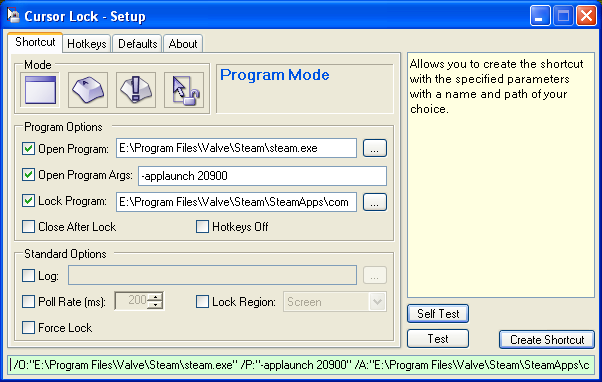
  6. Select “Open Program” and then find the path to the Steam executable, usually it will be something like C:\Program Files\Valve\Steam\Steam.exe
  7. Select “Open Program Args” and put in -applaunch xxxxx where xxxxx is the 5-digit number you copied earlier.
  8. Select “Lock Program” and then find the path to the game’s main executable–this would be what one would usually set as the “Open Program” when Steam isn’t involved. If you don’t know where it is, you should start looking under C:\Program Files\Valve\Steam\SteamApps\. You can also use Task Manager to help you find the executable name when the game is running.
  9. You’re done! Hit the “Create Shortcut” button to create a permanent shortcut to the game with Cursor Lock.
news300

Using Cursor Lock with Steam Games

Posted in Gaming | Tagged , | 51 Comments

Gaming Habits

Going to try to do a less epic blog post today. Realizing more and more that I just don’t have it in me to work on the site much anymore–stupid day job.

I just updated my mods for Diablo 2 to support patch 1.13. Really there wasn’t much difference between 1.12 and 1.13 as far as the modded files were concerned, but I diligently checked all the files regardless. Only the Balance Better Drops Mod needs to be updated to work with 1.13, although I’m betting it’ll probably work fine regardless as the changes were so slight. Find the mods here.

Also on game mods, I did a small mod (more of a hack really) for Tropico 3 a couple months ago that lets you put your own music into the game. The hardest bit was decompiling the compiled LUA code that controlled what music files could be played (a playlist), which I did by hand since no existing decompilers worked. Then I wrote my own LUA script to load whatever music I wanted and modded the LUA compiler to make Tropico-compatible compiled LUA files. You can find all the hot details of the efforts on this thread of the official Tropico 3 forum, and a guide written by another member that sums up my process on this thread.

news299

Lego Batman Complete

While I’m on gaming, I’ll just go through what I’ve been playing recently. Obviously, the girlfriend and I are playing Diablo 2 coop again. In between that, I’m back to trying to beat The Witcher (Enhanced Edition this time). I also replayed Halo (action is still good, but shorter and uglier than I remembered), Titan Quest with Kaylen, and Startopia. Fallout 3 ruled December, except for the part of winter break where Kaylen and I got 100% on Lego Batman (screenshot at right).

Posted in Gaming, Modding | Tagged | Leave a comment

Work Grinder

Obviously, I haven’t blogged in a while. It’s been so much longer than my usual lapse that one may have even feared the worst. Well, it’s close enough–I became employed. Indeed, forty hours a week (plus twenty more in support of it), I work at my alma mater’s library handling anything decidedly too technical for my 25 coworkers. I enjoy the tasks of my job; they stay pretty varied, so I never get bored. I’ve been working with WordPress, PHP, streaming video (both Flash and Apple’s Darwin streaming servers), Apache, JavaScript and HTML DOM, plenty of graphics editing, and of course the usual HTML editing. Sometimes, I even have fun doing work. The people are all rather nice, too, albeit I have a difficult time connecting to most of them personally (considering the demographics of your typical librarian).

However, I resent all the hours that I have to put into my job and how it drains me physically and mentally such that I have no time for personal projects (i.e. everything on this site). On some weekdays, I’m too tired to even enjoy video gaming. And on the weekends, playing video games is all I can seem to do. Clearly, anyone counting on me to work on any of my mods or programs, should lose most of their hope now. Though, whenever I get contacted by users, it is enough to motivate some work. My only solace is that I don’t have to stay with this job forever.

But having money is pretty cool. 😉 I’ve never had more than a few hundred dollar in my whole life before I started working. Only two months into the job, I couldn’t stand it anymore and had to buy the parts for my new computer, Serpent 3 (hopefully, more on this in a future post soon). Also, it’s even more convenient buying and downloading games on Steam than it is to pirate them from Bittorrent. And it doesn’t hurt that I can afford to buy my girlfriend nice things now. Ah, money…I love you.

Posted in Website | Tagged | Leave a comment

Putting the Half-Life 2 G-Man into Half-Life: Source

I’ve been looking for an excuse to get into some Source Engine modding ever since Half-Life 2 came out; and sure, I’ve wanted to do my own total-conversion mod (who hasn’t?) but knew I lacked the attention span to do so. So, along comes Half-Life: Source, a straight port of Half-Life content into Half-Life 2’s Source Engine. However, as I detailed in a post almost two years ago, Valve couldn’t even be bothered to do some decent textures or models for the port, despite them having most of the necessary materials already created for HL2.

This omission of graphical upgrade really irked me. At the time of the aforementioned post, I had even tried to copy the G-Man from Half-Life 2 into HL: Source, but alas the animations didn’t match up. Recently, I decided to go back through HL: Source again on a whim. Greeted with the same low-poly models and low-res textures as last time, I became more stalwart in my longing for high-quality graphics. I took another look at the G-Man to see how I might overcome his lack of vanilla Half-Life animations.

Continue reading

Posted in Gaming, Modding | Tagged | 4 Comments