Category Archives: Gaming

OMG!! Deus Ex 3!!!1

I’m crazy psyched about the upcoming Deus Ex game. Maybe I’m just being a fanboy, but I think the trailers Eidos Montreal have put out for it are the best I’ve ever seen for a video game. The style, clarity, music, action, and glimpses of story are all hyper-intense–a couple even get me choked up at times. In the HD trailers, it’s hard to even tell the difference between pre-rendered CG, in-game cutscenes, or actual gameplay footage.

news305

Beyond the feel of the game, the play sounds like it’s shaping up quite nicely as well. PC Gamer has a couple of good articles about all the gameplay aspects up:

Posted in Gaming | Tagged | Leave a comment

Tis the Season for Blog Updates

Fa la la la la…

It’s been a mixed enjoyment holiday season this year. I won’t get into all the personal details, but here’s some things that were delightful recently.

I finally released my little map for Company of Heroes: Opposing Fronts earlier in the month. As mentioned in previous postings, I decided to call it “Hurtgen Forest”. I’ve only published it on two sites other than my own for the moment, trying to get some initial feedback in case tweaks need to be made. So far, the lurkers on my RelicNews thread have been rather useless douchebags (I think they feel threatened), but the review on Filefront both praised my map while giving helpful feedback to consider. More info and download for Hurtgen Forest.

I also did a snazzy trailer video to promote the map (and because I LOVE editing video). Although I’ve embedded it everywhere the map is, here’s the video again:

I did another video to demonstrate how to use my program, File Lister, as well. It shows how to use it to do batch renaming. To limit the number of videos I have embedded in one post, just see the File Lister page to watch. I’m quite surprised by how often I end up needing File Lister at work and at home. I think it’s almost as essential as Regex Buddy for any geek. I’m also finding more and more sites publishing or linking to File Lister since it’s naturally the most advanced and feature-rich program of its kind.

And finally, the obligatory 100% completion screenshot for Lego Harry Potter. The girlfriend and I just finished it last weekend. Also, 100% completion for all the other lego games we’ve played. Can’t wait for Lego Pirates of the Caribbean so we can continue our addiction. Actually, co-oping with your girlfriend is probably half the fun.

Posted in Gaming, Modding | Tagged , , , , | Leave a comment

Using Cursor Lock with Steam Games

See updated instructions for 2021.

I often notice people coming to my site from search queries asking how to use my program Cursor Lock. Of course, Cursor Lock comes with plenty of documentation for most users’ needs. I think most of those people are either noobs that can’t find the documentation, or they want Cursor Lock to do something it doesn’t actually do.

Anyways, there is one circumstance where I haven’t documented how to use Cursor Lock, mostly because I only just realized it myself. However, it can be rather tricky, so here’s how to lock games that must be launched with Steam. These instruction will work for the new version that just came out on April 26 and the previous version.

  1. Open Steam and go to your list of games.
  2. Right-click on the game in question and select “Create Desktop Shortcut”.
  3. Find the shortcut on the desktop and right-click to examine its “Properties”.
  4. For the new version of Steam, look at the “Web Document” tab and then the “URL” box. For the old version, look at the “Shortcut” tab and then the “Target” box. Copy the 5 digit number you see there.
  5. Open Cursor Lock Setup.
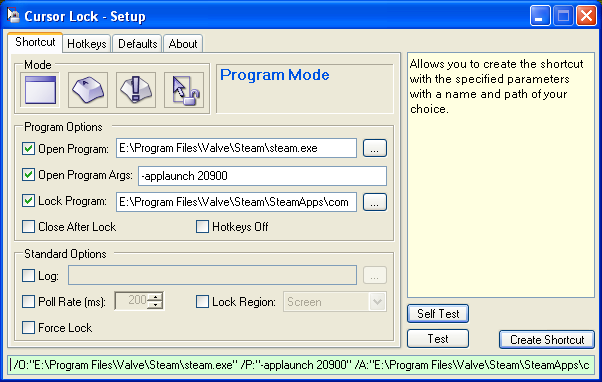
  6. Select “Open Program” and then find the path to the Steam executable, usually it will be something like C:\Program Files\Valve\Steam\Steam.exe
  7. Select “Open Program Args” and put in -applaunch xxxxx where xxxxx is the 5-digit number you copied earlier.
  8. Select “Lock Program” and then find the path to the game’s main executable–this would be what one would usually set as the “Open Program” when Steam isn’t involved. If you don’t know where it is, you should start looking under C:\Program Files\Valve\Steam\SteamApps\. You can also use Task Manager to help you find the executable name when the game is running.
  9. You’re done! Hit the “Create Shortcut” button to create a permanent shortcut to the game with Cursor Lock.
news300

Using Cursor Lock with Steam Games

Posted in Gaming | Tagged , | 51 Comments

Gaming Habits

Going to try to do a less epic blog post today. Realizing more and more that I just don’t have it in me to work on the site much anymore–stupid day job.

I just updated my mods for Diablo 2 to support patch 1.13. Really there wasn’t much difference between 1.12 and 1.13 as far as the modded files were concerned, but I diligently checked all the files regardless. Only the Balance Better Drops Mod needs to be updated to work with 1.13, although I’m betting it’ll probably work fine regardless as the changes were so slight. Find the mods here.

Also on game mods, I did a small mod (more of a hack really) for Tropico 3 a couple months ago that lets you put your own music into the game. The hardest bit was decompiling the compiled LUA code that controlled what music files could be played (a playlist), which I did by hand since no existing decompilers worked. Then I wrote my own LUA script to load whatever music I wanted and modded the LUA compiler to make Tropico-compatible compiled LUA files. You can find all the hot details of the efforts on this thread of the official Tropico 3 forum, and a guide written by another member that sums up my process on this thread.

news299

Lego Batman Complete

While I’m on gaming, I’ll just go through what I’ve been playing recently. Obviously, the girlfriend and I are playing Diablo 2 coop again. In between that, I’m back to trying to beat The Witcher (Enhanced Edition this time). I also replayed Halo (action is still good, but shorter and uglier than I remembered), Titan Quest with Kaylen, and Startopia. Fallout 3 ruled December, except for the part of winter break where Kaylen and I got 100% on Lego Batman (screenshot at right).

Posted in Gaming, Modding | Tagged | Leave a comment

Putting the Half-Life 2 G-Man into Half-Life: Source

I’ve been looking for an excuse to get into some Source Engine modding ever since Half-Life 2 came out; and sure, I’ve wanted to do my own total-conversion mod (who hasn’t?) but knew I lacked the attention span to do so. So, along comes Half-Life: Source, a straight port of Half-Life content into Half-Life 2’s Source Engine. However, as I detailed in a post almost two years ago, Valve couldn’t even be bothered to do some decent textures or models for the port, despite them having most of the necessary materials already created for HL2.

This omission of graphical upgrade really irked me. At the time of the aforementioned post, I had even tried to copy the G-Man from Half-Life 2 into HL: Source, but alas the animations didn’t match up. Recently, I decided to go back through HL: Source again on a whim. Greeted with the same low-poly models and low-res textures as last time, I became more stalwart in my longing for high-quality graphics. I took another look at the G-Man to see how I might overcome his lack of vanilla Half-Life animations.

Continue reading

Posted in Gaming, Modding | Tagged | 4 Comments

A Special Happy, Fun-Time Holiday Post

As is customary for an after semester post, I will say how the semester was a bitch and report my grades. Well, it was a bitch, and I didn’t get anything below a C, so woot. The biggest bitch part was a recommendation report for an BS required English course; unfortunately, it was a group project and I chose a topic that my group was completely incapable of working on: parallel computing. Although a couple sections are missing, the paper is in a refined enough state that I’ve decided to post it here. I’m now a self-taught expert on parallelism, at least.

On my final exam day, CNET Download.com finally got around to approving my submission of Cursor Lock 2.0. It got a couple hundred downloads in the first few days alone, but has since slowed down to about 20 downloads a day. Of course, I never really expected it to be a hot, must-have app; it’s more of an awesome, there when you need it app.

For my next programming project, I’m looking into finally doing a Trillian log converter, which I first mentioned this time last year. Trillian’s native bastardized XML format does not scale well (the more you chat with someone, the longer it takes to access their log) and can only be read with the built-in log viewer. I think that any features which necessitated the use of a proprietary log format over HTML format are of questionable value. I’m sure I can replicate all of the most important features in simple, universal HTML format: bookmarks, search (via Google Desktop Search or something similar), calendar (from splitting into different files by date), and masking different message types (through some delicious CSS and JS). It has the added benefit of extensibility, too; I plan on giving all the page elements their own class, so users can change log formatting to suit their preferences.

news247

Duber the pet monkey from Siberia says hello.

I’ve only written a specification outline for the program so far. Mostly, I’ve just been relaxing to some gaming. The AOE3 expansion, Asian Dynasties, has renewed my interest in Age of Empires. I skipped the War Chief expansion because, frankly, I’m tired of fucking Indians. But the added map locations, high-level home city cards, and civs of Asian Dynasties is just what the game needed. Although China’s unit training differences are too odd for me to handle, Japan has really killer unit upgrade cards plus powerful units already that compliment my turtling style.

Of course, I had to play Portal and Half-Life 2: Episode 2 also. Portal was so fun that I finished it in one sitting 😕 –it was a truimph. Episode 2 was also pretty good; there are some really intense firefights and well-crafted environments. However, as with Fortress Forever, locking issues started creeping up again. Lowering the sound acceleration in dxdiag seemed to make some difference in the time it took to lock, but ultimately they were still completely random. Monitoring component temperatures showed that the CPU temperature was a little high (but still nowhere near the 140F I reached over summer), so I cleaned the HSF out again. That further decreased the frequency of locks, but alas the problem remained with Source Engine games. My latest hunch is that the CPU is just getting tired of the overclock of 100Mhz (2.15 to 2.25Ghz) I imposed years ago. So I’ve been lowering that by half with nVidia’s old nForce2 system utility before playing. So far, results have been promising.

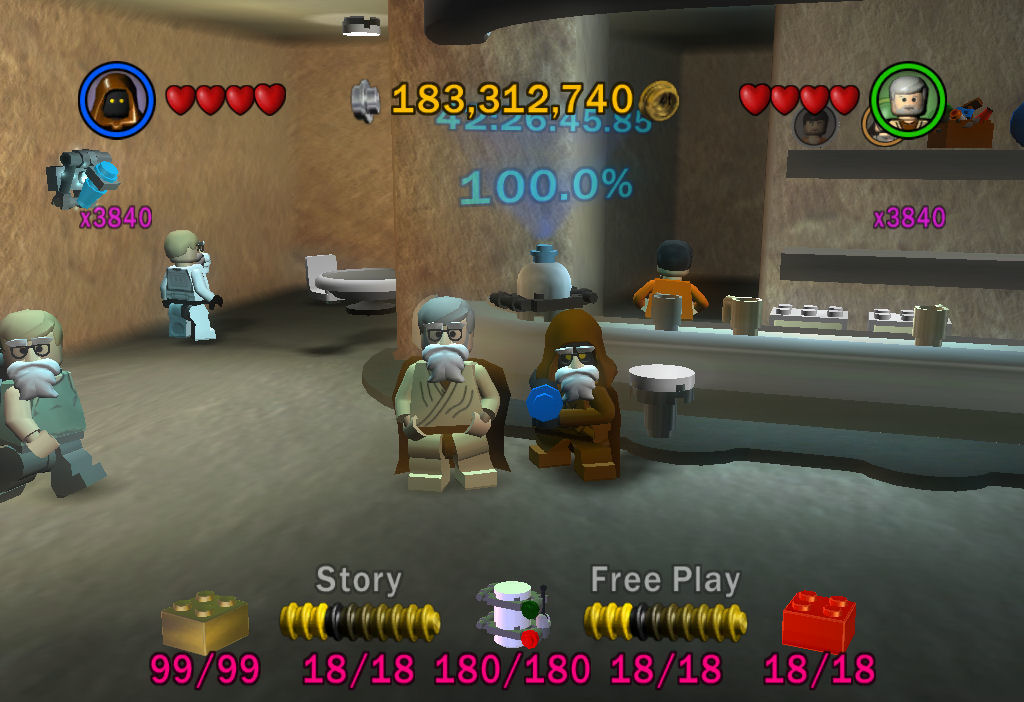
As for games that don’t lock my system up, Kaylen and I finally reached 100% completion in both Lego Star Wars games during her recent visit. It’s clear that the second game is by far superior, but going back and playing the first game from the newer trilogy was still kickass lego fun. Next year: Lego Indiana Jones. Oh, hell yes.

news246

Lego Star Wars

news245

Stud fountain with 3840x score multiplier and Santa disguises.

Posted in Gaming | Tagged , , , , , | Leave a comment