I’ve mostly been playing Grand Theft Auto 3 lately. Honestly, I was mainly just hankering to find secret packages. Hunting those packages down and then having easy access to weapons for completing the missions is the best part of those 3D GTA games. As far as I can remember, they totally neutered the secret package hunting in GTA IV. You can still find them, they just hardly give you any reward.
GTA V seemed to have many different types of collectables, but I’m not sure what the rewards were like as I didn’t play it long enough to find out (only about 50 hours). I may have complained about this before, but the amount of story in V is just so overwhelming that I got bored with it quite frankly. That’s why I love the GTA3 era games (including Vice City and San Andreas). They’re proper games, and the story is only an amount necessary to introduce the gameplay.
But boy is GTA3 janky.
There’s quite a bit of graphics jank, like aggressive pop-in and a frame limit of only 30fps. There’s also some movement issues like running down stairs launching you forward, jumping going in the direction you last moved, and that stupid little derp animation that plays if you try to jump when too close to something. And the Dodo… what the hell is that about. It’s so blatantly uncontrollable that a message comes up telling you how long you managed to fly for whenever you land.
Although, to be fair, they did a great job with the control setup screen. You can bind multiple mouse and keyboard buttons to a control, foot and vehicle controls don’t conflict with each other, and it even recognizes the forward and back mouse buttons. Plus the MP3 support is still pretty awesome—the killer feature for the PC version. And the fact that you can put Windows shortcuts into the mp3 directory to load copies of MP3 files that exist elsewhere (in your music library most likely) is still very much appreciated. Cruising around the world while listening to your favorite 90s and early 2000s music is just… chef’s kiss. I only wish it could shuffle the playback.
However, the built-in radio stations in GTA3 are pretty shite, especially compared to the amazing 80s music radio stations in Vice City. The only memorable song in GTA3 is Fade Away from Head Radio. So, please humor me while I make some music recommendations for your GTA3 mp3 folder.
- Rage Against the Machine—Wake Up and Bulls on Parade are must-haves.
- Nine Inch Nails—Burn, The Perfect Drug, and Driver Down (from the Lost Highway soundtrack) are all super intense for when you’re weaving through traffic at high speeds.
- Rob Dougan—Clubbed to Death (Kurayamino Mix). Such a badass song. Drive around and feel like a badass.
- Garbage—Queer has a nice chill, grunge sound for driving to.
- Deftones—My Own Summer (Shove It). Yes, yet another one from the Matrix soundtrack.
- Cake—Rock n Roll Lifestyle. I dunno, it’s just a good driving song.
- Marilyn Manson—The Fight Song, Spade, Tourniquet. Just good killing music.
- Smashing Pumpkins—Bullet With Butterfly Wings. Well… it’s good.
- White Zombie—More Human Than Human. I can’t understand most of the lyrics, but it has an awesome guitar riff that would get anyone pumped up.
- Prodigy—Smack My Bitch Up because you have to have some Prodigy in there.
Mods
There are quite a lot of mods for GTA3, though, at least. After a thorough perusal of the PCGaming Wiki page for the game, the required mods seem to be SilentPatch, an ASI loader, and Framerate Vigilante. SilentPatch is the definitive community patch for the 1.0 version. Note that no mods appear to support the 1.1 version that comes with Steam downloads, so don’t waste your time with it, and instead just get a 1.0 NoCD cracked exe from somewhere
Framerate Vigilante fixes a lot of timing issues that are created by running at higher framerates than the default 30fps. It’s a must-have if you don’t want eye strain and a headache. And the ASI loader is required for Framerate Vigilante. I also found the full-screen map mod extremely useful (and it needs an ASI loader as well).
Subdued Gangs
Naturally, my own GTA3 mod, “Subdued Gangs”, is also a good addition. However, I’ve been wishing that I came up with a better method to solve the gang attack annoyance. If you’ve never played GTA3 before, the gist of the problem is that there are several gangs in the game world that will inevitably get pissed at you at some point as you progress through the missions. And when they are pissed, being in their territory can be quite deadly. They pop in from everywhere and instantly target you if you’re anywhere in front of them with pistols, uzis, and even shotguns.
My mod mitigates this gang threat by just giving the gang members melee weapons once they start hating the player. But you can still be swarmed quite easily if you’re on foot or stopped in your vehicle. Because they only have melee weapons, their only option is to try to pull you out of your vehicle, which can cause some missions to fail (still better than getting your vehicle all shot up, I guess). I would have liked to find a way to lower their threat range and reaction time instead, so you have to be like 10 feet away for a couple seconds before the gang members aggro. (That’s more like how gangs work in Vice City if I’m remembering correctly.)
I looked all through the list of opcodes for mission scripts to see if there was any other way to affect the gang threat system, but alas, found nothing (other than turning the gang threat off completely). I started asking Claude about the project, and it confirmed what I was dreading: probably the only way to mod the gang threat behavior was to patch the executable, which naturally seemed overwhelming. But then Claude made me aware of a critical resource, a project that fully “decompiled” the GTA3 executable to readable C++. With that as a reference, trying to find the right bytes to patch actually seemed within reach.
I found a few numeric values in the decompiled source code that could both feasibly change how the threat detection for pedestrians (including gangs) occurs and also be easily changed in the assembly. The first value controlled the maximum range that a pedestrian can see another pedestrian threat—the default was 30 meters. Then there was separate code for detecting vehicular threats, and that had a default distance of 20 meters. But the trickiest one was the code for limiting the angle that a pedestrian can see a threat; the default here was > 0.0, which basically meant “anything in front of the pedestrian”. Yep, a full 180° vision cone—that seems fair and normal, eh? 😝
Then came the hard part: trying to figure out where those values were in the executable. But I hadn’t done any disassembly in a while (not since my No Equipment Loss on Death mod for Diablo 2) and was never all that skilled at it to begin with. I thought I’d start over fresh and give Ghidra a try since I’d seen a few mentions about it lately. It’s a disassembler/decompiler made by the NSA and released as free open-source. However, it’s written in Java to be cross-platform, so it has that Java-clunkiness that those apps always seem to have on Windows.
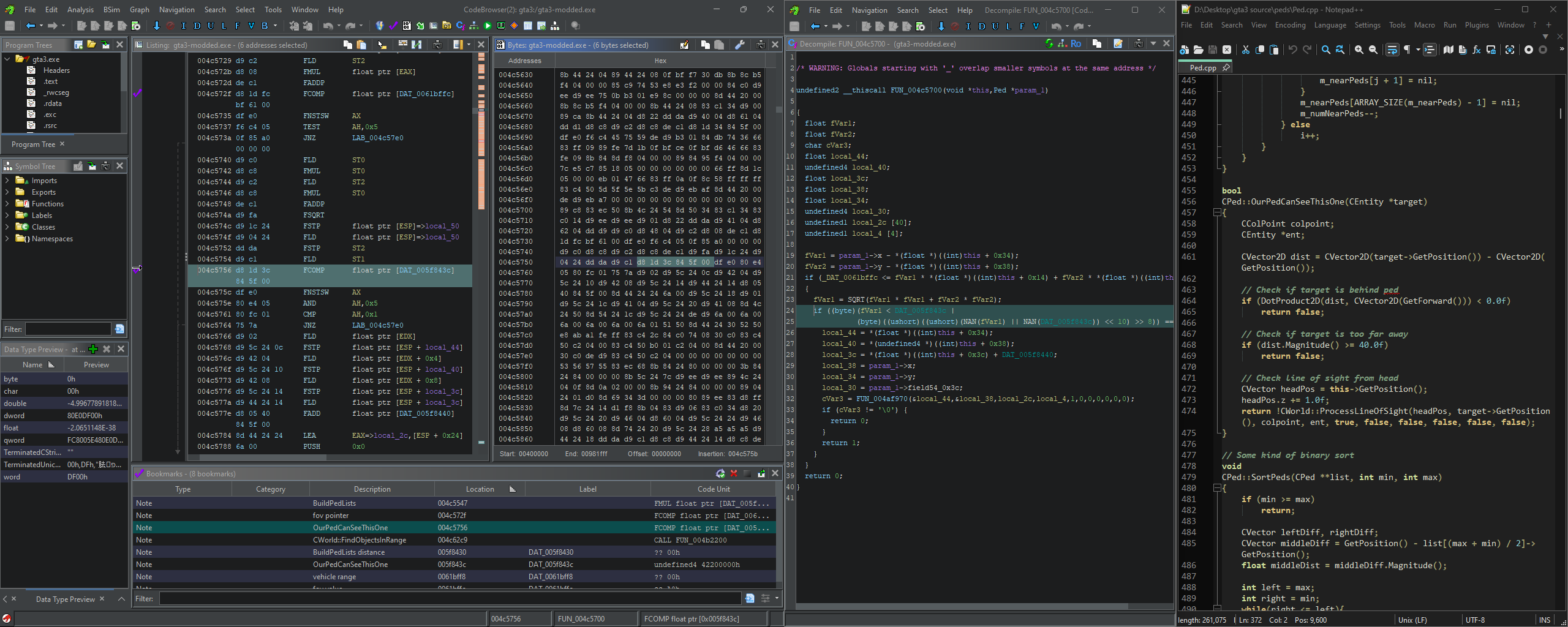
The Ghidra UI is overwhelming to look at.
There are many matches for each of these target values in the assembly: 91 matches for 30.0, 69 for 20.0 (nice), and well over a thousand for 0.0. I had Claude make a few Python scripts to analyze each of the matches and narrow down the list of address candidates. It seemed to be mostly looking for other values in close proximity to our target ones. But this ended up being fairly tricky since some values are used directly in operations and others are given as an address to where the value is stored. It got easier as we went, though.
For a proof of concept, I modified the executable directly. However, two of the target values had multiple references in the assembly, so to avoid causing conflicts, I used a little bit of unused padding at the end of the .data section and pointed the operations to the new addresses instead. In the end, I only needed to change 20 bytes (3 floats and two 32-bit pointers). The distance limits worked just fine in this patched exe. I tweaked the new values until I settled on 8.0 and 10.0 as being balanced maximum distances (for peds and vehicles respectively).
But changing the FOV limit had some weird behavior. The gang member FOVs seemed to be tighter only some of the time. After a few hours of testing, Claude pointed out that the FOV check in the source didn’t normalize the direction vector to a value between 0 and 1. So, the new limits only worked if you were really close to the gang members. Normalizing the vector would have been pretty tricky in assembly, so we decided it was time to move on to making an ASI mod.
ASI mods are just DLLs that are loaded into the game’s memory space and then executed to inject code into the assembly. I couldn’t find anywhere that said what the ASI acronym actually meant, but apparently it comes from an early modding technique by which the Miles Sound System (a sound library used by GTA3 and VC) automatically loaded and executed any .asi files in the game directory. Nifty.
But with an ASI mod, we could hook into existing function calls to run our own code beforehand and then bypass the original function if desired. So, in this case, it meant we could intercept the function call that checks the FOV, normalize the direction vector between the ped’s forward vector and the target vector, then do a proper angle comparison. If the angle was less than our custom threshold, then we just bypass the original function altogether—the ped sees nothing.
Once I had the Visual Studio project setup, Claude did basically all the coding, and it compiled and worked perfectly. I had Claude also add some code to load custom settings from an INI config, so it would be easy to tweak the thresholds without recompiling. I decided on a 70° FOV after some further gameplay testing. That felt more human, and gave the player enough room to possibly maneuver around the gang members if they spotted them first.
I made a video to demonstrate the change by comparing the vanilla and modded gameplay when driving around. Pay attention to the number of times the player’s car gets shot.
At the same time as I was making the ASI version of the mod, I was also fiddling with the old SCM version. Although the old Barton Waterduck Mission Builder (what a stupid name 😄) still ran and compiled fine, it hasn’t been updated since I originally created the mod back in 2007. So, I thought I’d investigate the new standard mission script compiler, Sanny Builder. The improvements over the Barton Waterduck one were underwhelming, frankly; however, it did have better jump and variable labels, so the scripts were slightly easier to read and navigate.
I figured since I was a dumbass and didn’t mark any of my changes in the original mod, I’d try to remake the mod in the new Sanny Builder format (with proper documentation this time). The decompiled mission script is like 100k lines long, so having every change clearly marked is important if you ever need to fix something again later. I also took this opportunity to change the “subdued” reset trigger from the “Turismo” mission to the “Mafia Massacre” RC mission and added a new reset to defaults trigger to the “Diablo Destruction” RC mission. Although Turismo could be repeated indefinitely, it isn’t available immediately when starting the game and doesn’t have a counterpart to revert gang weapons back to default, so I though the Portland RC missions were a better choice. It might be even better to hide some proximity markers somewhere in Portland to trigger the resets, but I haven’t taken the time to figure that out yet—maybe in the future.
While I was playing the game, I also came across a couple minor mission annoyances that I thought I’d fix in the mission script as well just because I could. The first fix was to the mission “Deal Steal” where you have to find a Yardie Lobo to complete the mission. I drove around for a solid half hour trying to find a Lobo, but to no avail. After searching Google a bit, I discovered the reason I couldn’t track one down was that there’s no static spawn for the Lobo anywhere and it looks almost exactly like an Idaho—it just has a different interior. Given that, I decided I should just spawn a Lobo somewhere easy to find during the mission. So, I put one in the parking lot next to the Newport parking garage. Easy peasy.
And my other fix was in that same area. I was at 99% complete and just needed to do the final story mission and the last off-road mission, “Multistorey Mayhem”. I hadn’t come across the mission naturally, and the GTA3 map just said it was in that same Newport parking garage. But none of the cars in the parking garage started a mission. I read some forum posts online but they weren’t making sense—you have to bring a Stallion into the garage to start the mission?? Apparently not, so I read a walkthrough instead. You actually have to enter a Stallion just outside of the parking garage! It’s not at all obvious that’s what’s required; there’s no other missions in the whole game that trigger like that. So, I just simply changed the condition so that any Stallion inside the parking garage triggers the mission. They frequently spawn in there so it’s easy to find naturally.
I realize that adding in two unrelated features into the SCM file aren’t really good modding etiquette. I should really be using the CLEO scripting system so that the changes are modular. But, since I’ve finished the game now, I’m ready to move on to some other projects. So, maybe in some future update, I’ll take the time to figure out CLEO and do the mod properly.
But for now, I’ve uploaded both versions of the mod to this site and also Nexus Mods. I’m trying to get better about putting all of my mods on there for increased visibility. I just worry that I’ll go through all that trouble, and then the site will just get bought out, enshittified, and then close down.
Website Upgrade
As for the other projects, I’ve also been working on giving this website a major overhaul. As you may have noticed, I’ve been using LLMs a lot to help me on projects now. It’s been really helping me not get overwhelmed by coding due to my illness; although, I’m still running at nowhere near 100%. So, this upgrade may take many months, but I feel like it’s necessary. My main goals are to upgrade to the latest WordPress version, design a new responsive theme with light and dark support, do a content refresh, and switch hosts.
So far I’m only about 15% done, but here’s a preview of the work so far. I’m trying to lean into the magazine layout more on the homepage, but much of the rest of the site will be pretty standard.

SnakeByte Studios 2026 website WIP
Ugh… I really gotta stop writing such long posts. 😝